
Oracle PeopleSoft is one of the most widely deployed enterprise resource planning (ERP) platforms in the world, used by large organizations across HR, finance, supply chain, and campus administration. Yet many IT professionals who work with PeopleSoft every day have only a partial picture of how its components fit together under the hood.
This guide breaks down the PeopleSoft architecture from the ground up — what each tier does, which components live inside it, and how a user request travels from a browser all the way to the database and back.
The Three-Tier Architecture
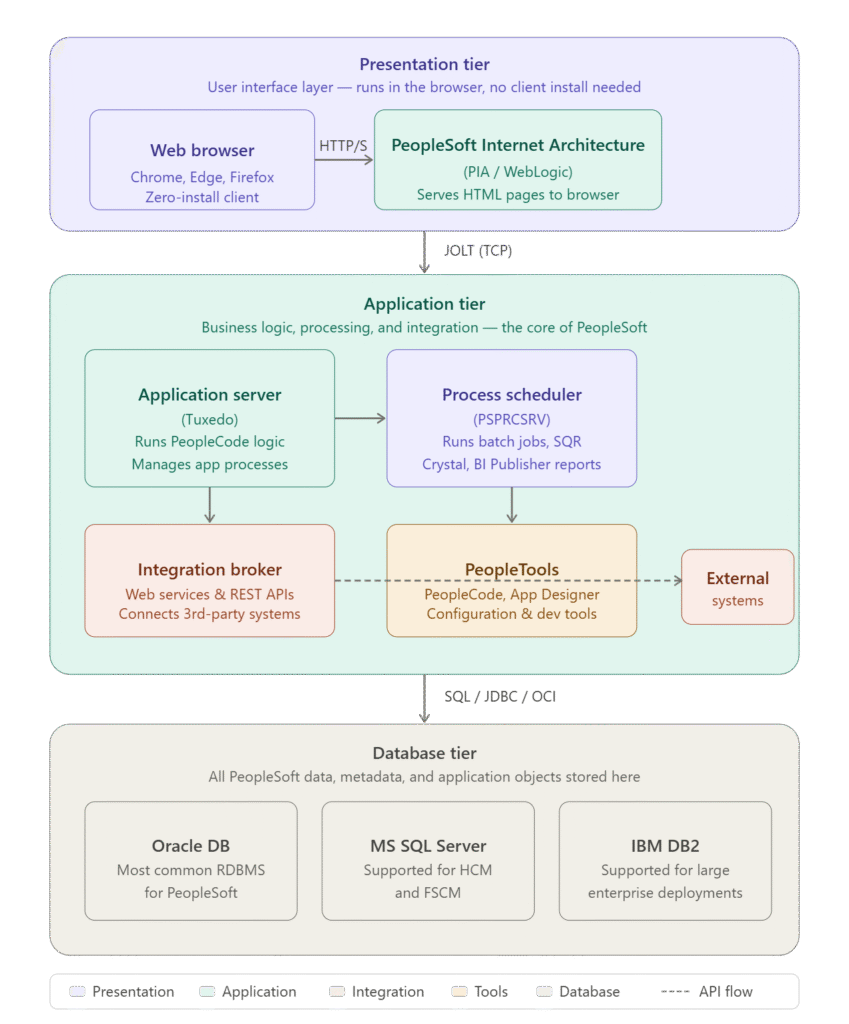
PeopleSoft is built on a classic three-tier architecture: a Presentation tier, an Application tier, and a Database tier. Each tier has a distinct responsibility, and they communicate through defined protocols. This separation is what makes PeopleSoft scalable, maintainable, and flexible enough to run in on-premises, cloud, and hybrid environments.
Tier 1 — The Presentation Tier
The top layer is everything the end user touches. PeopleSoft is entirely browser-based — there is no software to install on the user's machine. All interaction happens through standard web browsers like Chrome, Edge, and Firefox.
PeopleSoft Internet Architecture (PIA)
The central component of the Presentation tier is PIA — the PeopleSoft Internet Architecture. PIA is a Java EE web application that runs on Oracle WebLogic Server. When a user opens a PeopleSoft URL in their browser, WebLogic generates the HTML pages dynamically and sends them back. All navigation, form submissions, and search requests flow through PIA over standard HTTPS.
PIA is responsible for rendering PeopleSoft's pages, handling session management, and forwarding business logic requests down to the Application tier. It does not execute any business logic itself — that happens one tier below.
Tier 2 — The Application Tier
This is the brain of PeopleSoft. The Application tier contains several distinct server components, each with a specific job. They run on the application server host, which is typically a Linux or Windows server separate from the web and database servers.
Application Server (Tuxedo)
The Application Server is built on BEA Tuxedo (now Oracle Tuxedo), a transaction-processing middleware platform. It listens for requests from PIA using a protocol called JOLT (Java Object Linking and Tuxedo), which runs over TCP.
When a user submits a form in PeopleSoft, PIA sends that request via JOLT to the Application Server. The Application Server then executes the relevant PeopleCode — PeopleSoft's proprietary programming language — applies business rules, validates data, and fetches or writes records to the database. The result comes back through the same chain to the user's browser.
The Application Server manages several background processes simultaneously, including PSAPPSRV (main application handler), PSQCKSRV (quick service for read-heavy requests), and PSQRYSRV (query server for PS Query).
Process Scheduler (PSPRCSRV)
Not all work in PeopleSoft happens interactively. Payroll runs, GL journal postings, large data imports, and report generation all happen in batch mode — and that is the job of the Process Scheduler.
The Process Scheduler monitors a queue in the database for submitted process requests. When one comes in, it launches the appropriate program: an SQR script, a Crystal Report, a BI Publisher report, a COBOL program, or an Application Engine process. Completed output lands in a report repository accessible via the Report Manager in PIA.
Every PeopleSoft installation has at least one Process Scheduler domain, and large organizations often run several — separated by process type or environment.
Integration Broker
PeopleSoft rarely operates in isolation. It typically needs to exchange data with HR portals, payroll processors, learning management systems, or third-party finance platforms. The Integration Broker handles all of this.
Built on a publish/subscribe and service-oriented architecture model, Integration Broker exposes PeopleSoft functionality as REST APIs and SOAP web services. It can send outbound messages when PeopleSoft data changes, and receive inbound messages from external systems to trigger processes or update records. It communicates via HTTP/HTTPS and uses the Integration Gateway (a J2EE web application running in WebLogic) as its entry and exit point for external traffic.
PeopleTools
PeopleTools is not exactly a runtime server component, but it is the foundational development and configuration layer underpinning everything else in the Application tier. It includes Application Designer (the IDE for building PeopleSoft objects), PeopleCode (the scripting language), App Engine (the batch processing framework), Data Mover (for data migration), and the PeopleSoft Update Manager (PUM) for applying patches and bundles.
PeopleTools has its own version cycle, separate from the PeopleSoft application version. A PeopleTools upgrade is one of the most common and significant admin activities in a PeopleSoft environment.
| Component | Technology | Primary Role |
|---|---|---|
| Application Server | Oracle Tuxedo | Executes PeopleCode, manages app processes |
| Process Scheduler | PSPRCSRV | Runs batch jobs, SQR, reports |
| Integration Broker | Gateway + IB framework | REST/SOAP APIs, external integrations |
| PeopleTools | App Designer, PUM | Development, patching, configuration |
Tier 3 — The Database Tier
All PeopleSoft data lives in a relational database. This includes transactional records (employee data, journal entries, student enrollments), system configuration, security definitions, and even the application metadata itself — PeopleSoft stores its own page definitions, field definitions, and PeopleCode in the database.
PeopleSoft supports three database platforms:
- Oracle Database — most common and most fully supported option; the default choice for new implementations.
- Microsoft SQL Server — supported for HCM and FSCM implementations, particularly in organizations already running the Microsoft stack.
- IBM DB2 — supported for large enterprise environments, particularly on IBM AIX or z/OS.
The Application Server communicates with the database using the appropriate native driver — OCI for Oracle, JDBC for SQL Server, and DB2 CLI for IBM DB2. All SQL generated by PeopleCode and Application Engine goes through this connection.
How a Request Flows End to End
Here is what happens from the moment a user submits a timesheet in PeopleSoft:
- The user clicks Submit in their browser. The browser sends an HTTPS request to the WebLogic / PIA server.
- PIA packages the request and sends it over JOLT to the Application Server (Tuxedo).
- The Application Server executes the relevant PeopleCode — validating the timesheet data and applying business rules.
- PeopleCode sends SQL to the Oracle Database to read existing records and write the new timesheet rows.
- The database returns data to the Application Server.
- The Application Server returns the result to PIA, which renders the confirmation page as HTML.
- The browser displays "Timesheet submitted successfully."
If the timesheet submission also triggers a batch approval workflow or a notification to a third-party HR portal, that happens via the Process Scheduler and Integration Broker respectively — running asynchronously in the background.
Key Configuration Files and Tools
Every PeopleSoft administrator needs to know a handful of critical configuration touchpoints:
- PSADMIN — The command-line utility used to create, configure, start, and stop Application Server and Process Scheduler domains. Most admin work happens here.
- psappsrv.cfg — The main Application Server domain configuration file. Controls the number of server processes, timeout settings, cache directory locations, and Tuxedo parameters.
- psprcs.cfg — The equivalent configuration file for the Process Scheduler domain.
- WebLogic Admin Console (port 7001 by default) — Used to manage the PIA web domain: deploying the PeopleSoft web application, configuring SSL, setting connection pool sizes, and reviewing server logs.
Why This Architecture Matters for Your Career
Understanding the architecture is not just theoretical knowledge — it is the foundation for every PeopleSoft admin task. When you troubleshoot a slow page, you need to know whether the bottleneck is in PIA, the Application Server, or the database. When a batch job fails, you need to know which Process Scheduler process handles it and where its logs live. When Integration Broker messages pile up, you need to understand the gateway configuration.
The three tiers also map directly to how PeopleSoft environments are scaled. High-availability setups use load-balanced PIA nodes, clustered Application Servers, and Oracle RAC databases — and knowing the architecture tells you exactly where each piece of redundancy lives.
Summary
PeopleSoft's three-tier architecture separates concerns cleanly:
- Presentation tier (PIA on WebLogic) — handles the browser interface
- Application tier (Tuxedo App Server, Process Scheduler, Integration Broker, PeopleTools) — handles all business logic and processing
- Database tier (Oracle, SQL Server, or DB2) — stores everything
Requests flow: Browser → HTTPS → PIA → JOLT → App Server → SQL → Database, and back up the same chain.
Mastering this architecture is the first step toward becoming a confident, effective PeopleSoft administrator — and it underpins every advanced topic from PeopleTools upgrades to environment cloning to performance tuning.
Ready to Master PeopleSoft Administration?
Get hands-on training with real-time scenarios, expert instructors, and upgrade-focused learning.
✅ 30+ Hours Instructor-Led Training | ✅ Real-Time Lab Access
✅ PeopleTools Upgrade & Patching | ✅ Interview & Resume Support
📞 Call / WhatsApp: +91-7678211866 📧 Email: info@peppertechsolutions.com